Walkthrough
Two minutes, no sound, with captions. It covers the comparison, one wrong answer up close, and the limits. Recorded from the running app against its real saved results.
Read the captions as text
- 0:02 A dashboard for comparing LLMs on one real task, sorting support tickets, by accuracy, speed and cost.
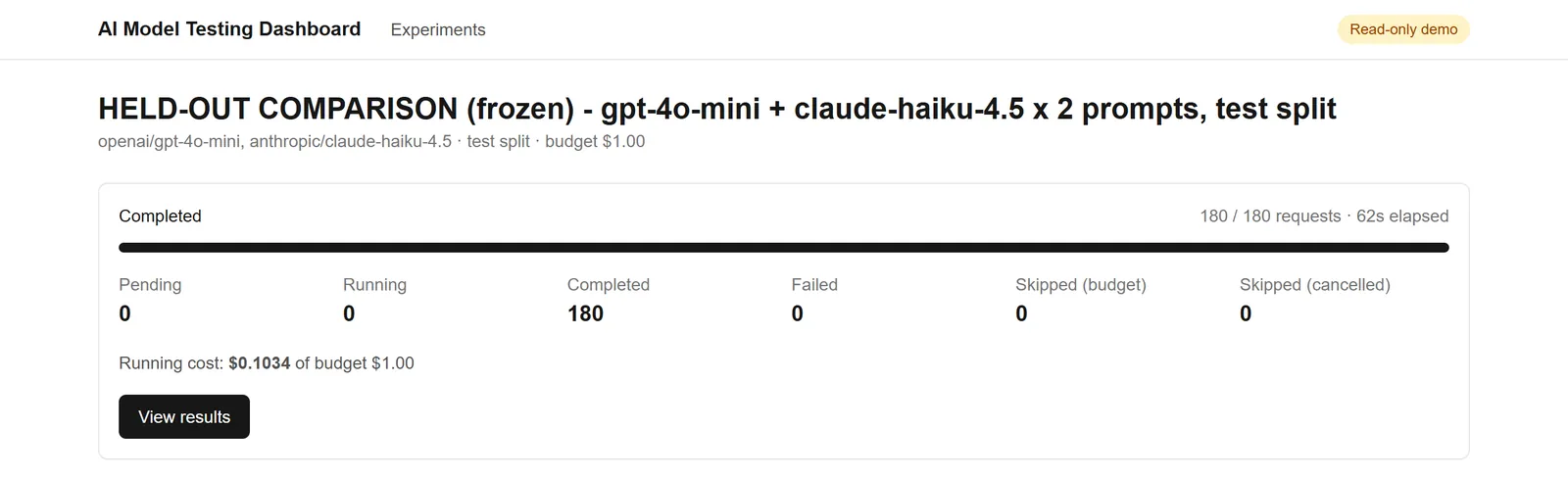
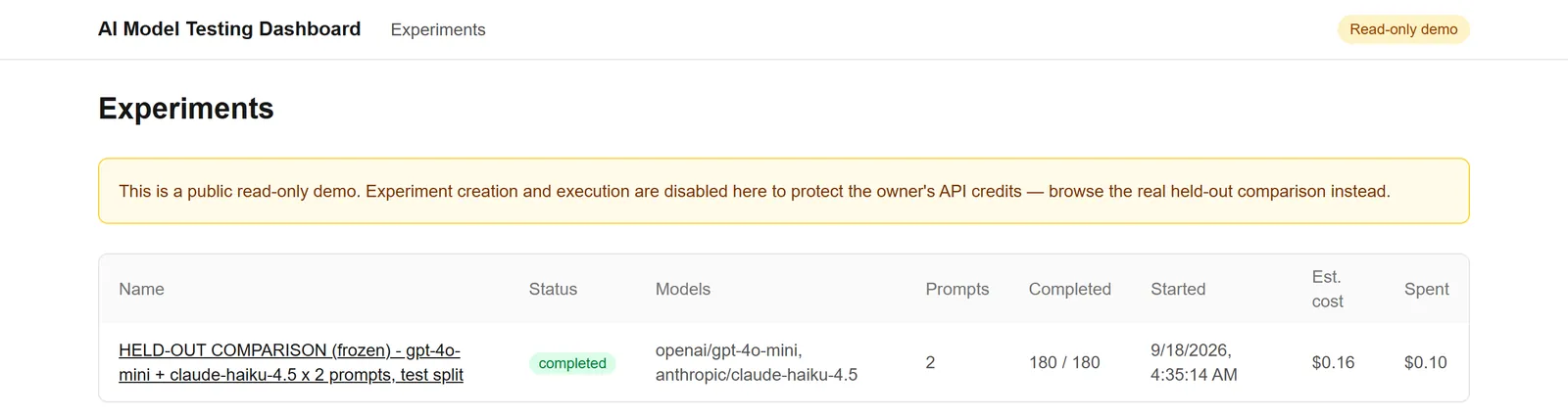
- 0:10 One frozen run: 2 models x 2 prompts x 45 held-out tickets = 180 real requests. All 180 completed in 62 seconds; none failed.
- 0:15 Cost, from recorded token usage: $0.1034 against a $1.00 budget cap that is checked before each request.
- 0:25 Every request returned valid output. Accuracy, latency and cost sit side by side, never merged into one score.
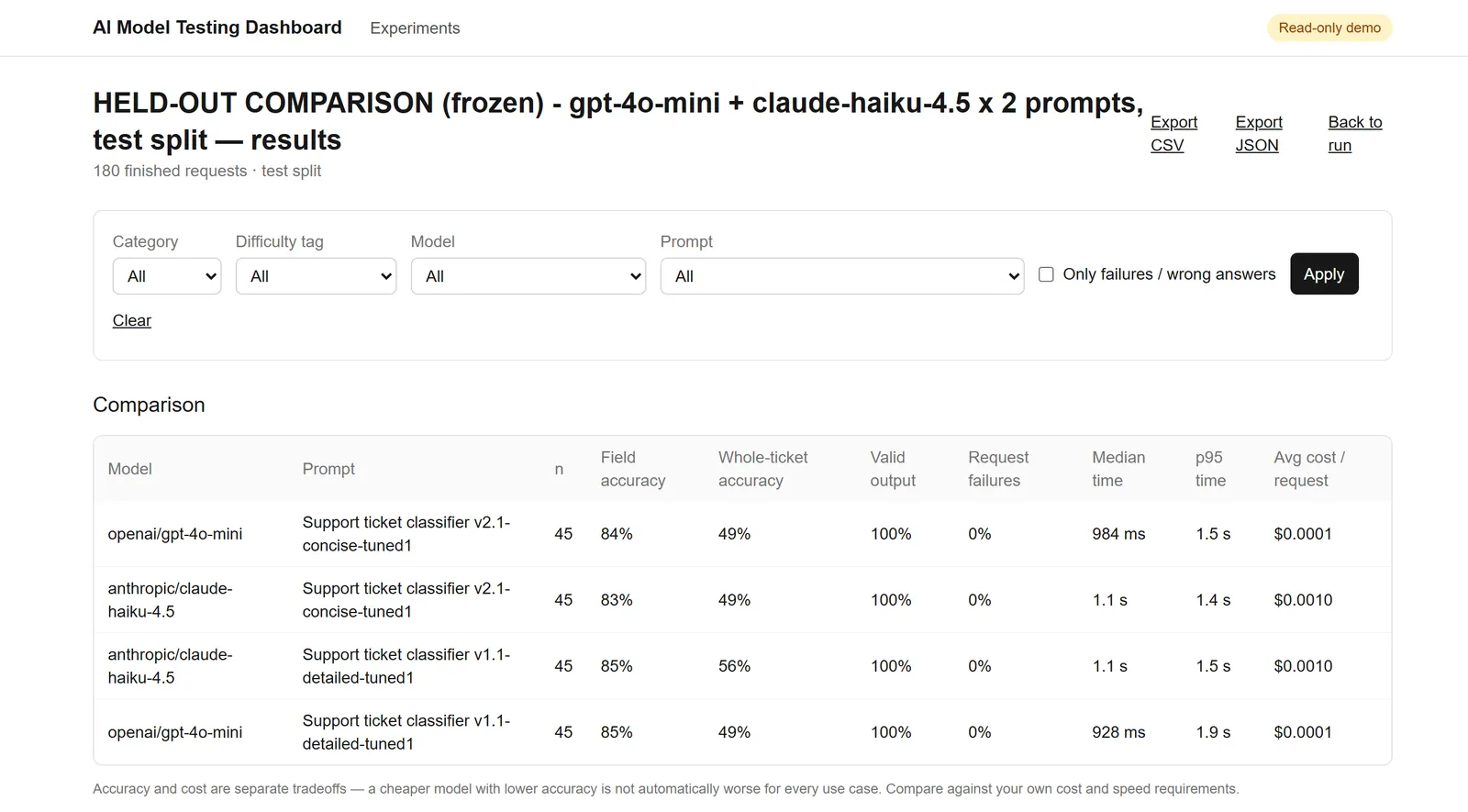
- 0:31 Whole-ticket accuracy: Claude Haiku 4.5 with the detailed prompt got 25 of 45 tickets fully right. Every other combination got 22 of 45.
- 0:38 That is a three-ticket gap on one repetition: a small-sample observation, not proof that either model is better.
- 0:44 The clear difference is cost: about 10x more per request for Haiku ($0.00105 vs $0.00010).
- 0:49 Median latency is roughly 11-20% higher for Haiku; the tail (p95) is mixed.
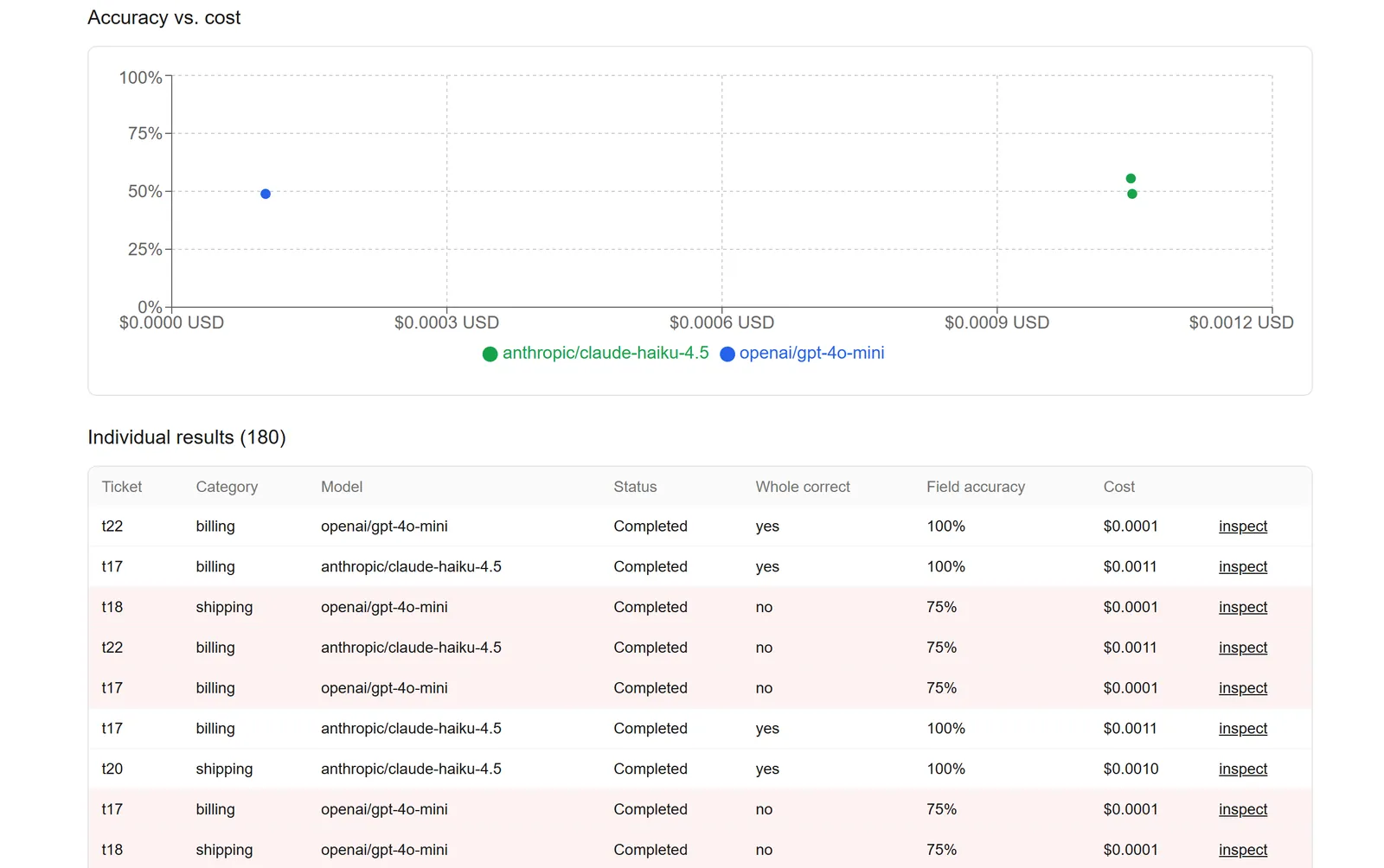
- 0:56 The same trade-off plotted: a large cost gap, for an accuracy gap this run cannot confirm.
- 1:05 Everything can be filtered and opened. Here, the account category, which scored lowest.
- 1:09 Only four tickets sit in that category (n = 4), so its 25% comes down to three tickets that most combinations missed.
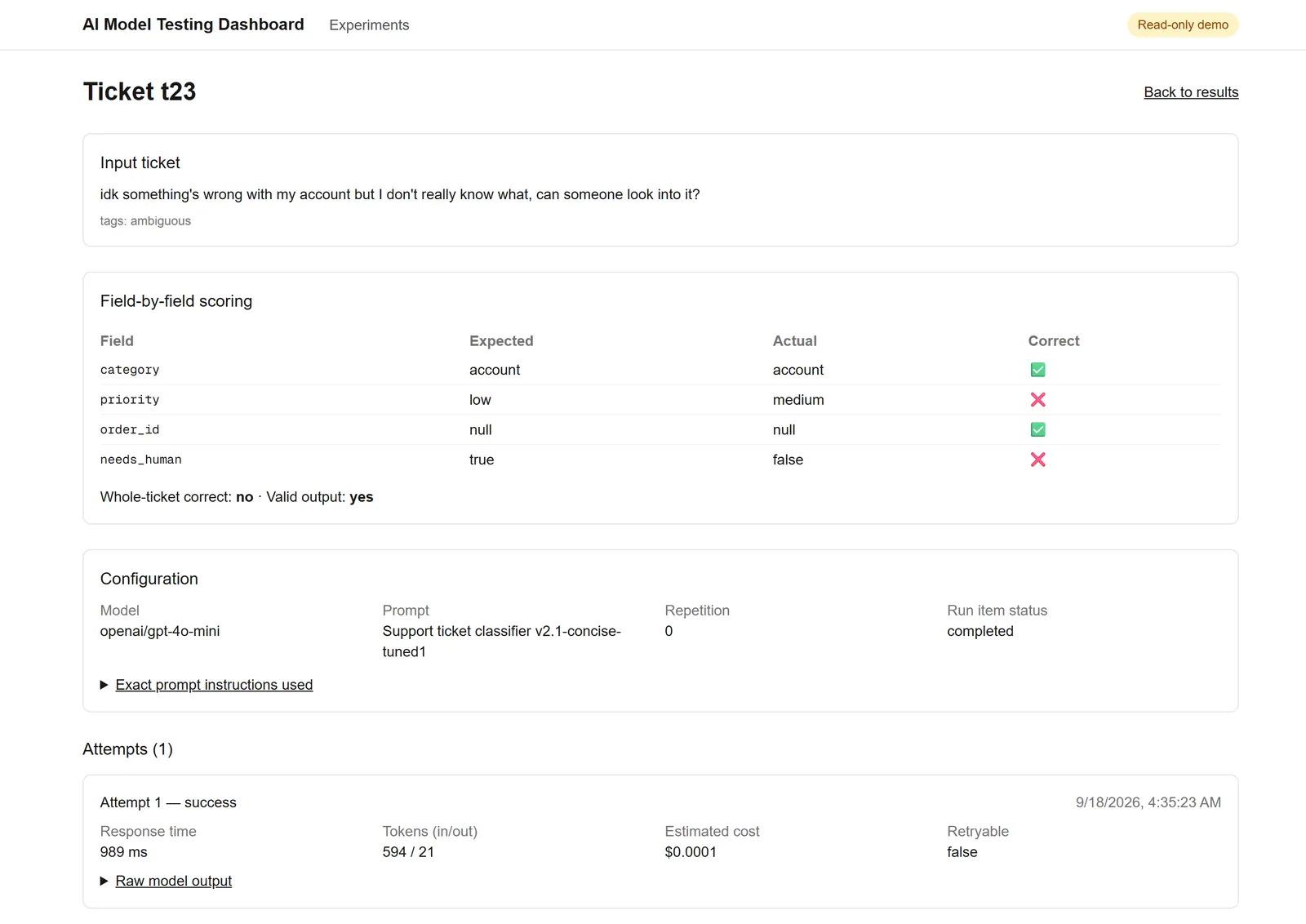
- 1:17 Every result opens to the exact input, expected answer and model output. Here, ticket t23.
- 1:25 GPT-4o mini (concise prompt) got the category and order ID right, but priority (medium vs low) and needs-human (false vs true) missed the label.
- 1:33 The exact prompt and the raw model output are one click away.
- 1:40 Across all 180 results, most misses were priority or needs-human disagreements on vague tickets. Order IDs were right every time.
- 1:47 Limits: 120 fictional tickets, one labeler, one repetition, exact-match scoring. A small comparison, not a benchmark.
The problem
Picking a language model for a task often comes down to habit or a headline benchmark. The real decision is a trade-off between accuracy, cost and response time, on your own task and with your own prompt. A model that is a few points more accurate but ten times the price can be the wrong choice for a high-volume job and the right one for a rare, high-stakes one.
I built the tool I would want for that decision: run the same test cases through several models and prompt versions, score every answer the same way, and show accuracy, latency and cost side by side instead of squeezing them into one “best model” number.
The task is support-ticket triage. Given a ticket, the model returns four fields: a category, a priority, the order ID if there is one, and whether a person should review it.
What I built, and my role
This is a solo project. I built the whole app: the experiment setup screen, the background runner, the scoring, the results views and the exports. The dataset is 120 fictional support tickets written for the project and labeled by me alone. I used an AI coding assistant while building it.
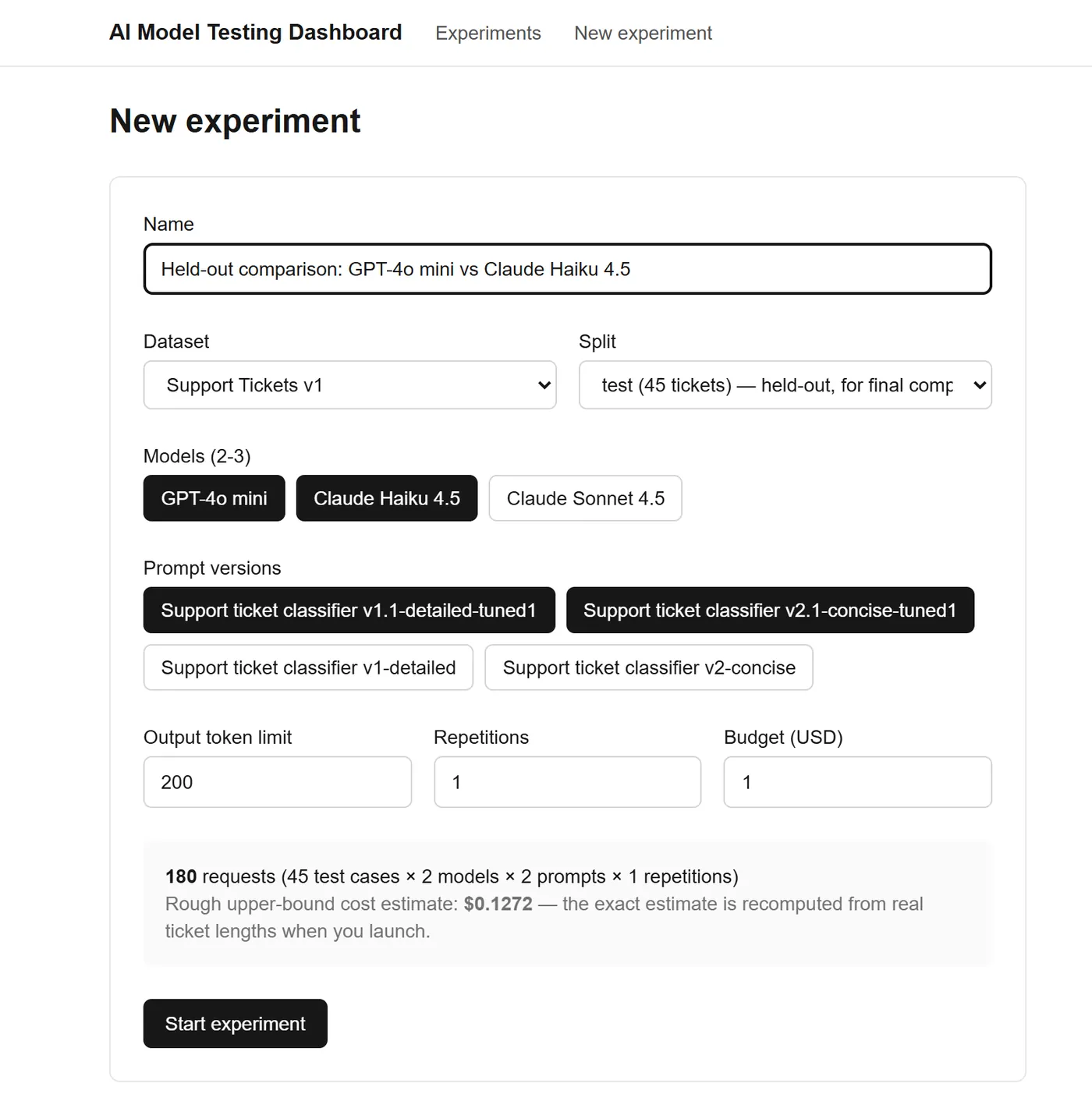
- A setup screen for choosing a dataset split, two or three models, prompt versions, an output limit, repetitions and a spending cap.
- A runner that executes every combination in the background and saves each attempt, its cost and its score.
- Results views: a comparison table, an accuracy-against-cost chart, and a filterable list of every request.
- A ticket inspector showing expected against actual output, the exact prompt used and the raw model response.
- CSV and JSON export, and a read-only mode for a public demo.
- 59 unit tests around the scoring and the runner’s decision logic.
How an experiment works
- Set up. Choose the dataset and split (75 tickets for tuning prompts, 45 held out for the final comparison), two or three models, one or more saved prompt versions, an output limit, repetitions and a spending cap. The screen shows how many requests that makes and a rough upper-bound cost before anything runs.
- Start. The server records every planned request (ticket × model × prompt × repetition) as pending, then works through them four at a time in the background.
- Ask. Each request sends one ticket to a model through the Vercel AI Gateway and asks for structured output. The response, token counts, response time and cost are saved.
- Score. Each answer is compared with the expected one field by field: category, priority, order ID and needs-human. A ticket is fully correct only if all four match, and output that does not fit the schema counts as invalid. No model is used as a judge.
- Compare. The results page shows field accuracy, whole-ticket accuracy, valid-output rate, failures, median and p95 response time and average cost for every model and prompt pair, plus a list of every request.
Tuning before the final run
Before the held-out run I tuned the prompts on a separate 10-ticket dev subset. Two problems showed up with both model families: return requests were not covered by the shipping category, and both models over-escalated priority on casual urgency words. I fixed both in the prompts, and corrected one dev label (t03) after re-reading my own scoring rubric, a judgment call I documented. None of the 45 held-out tickets were used in tuning.
What the run found
The frozen configuration ran two models and two prompt versions over the 45 held-out tickets: 180 real requests, made through the app against a live database and the AI Gateway. I recomputed every number below from the raw per-request export instead of copying it from my notes.
| Model | Prompt | Fully correct | Field accuracy | Median | p95 | Avg cost / request |
|---|---|---|---|---|---|---|
| GPT-4o mini | Detailed | 22/45 (48.9%) | 85.0% | 928 ms | 1,910 ms | $0.000102 |
| GPT-4o mini | Concise | 22/45 (48.9%) | 83.9% | 984 ms | 1,485 ms | $0.000102 |
| Claude Haiku 4.5 | Detailed | 25/45 (55.6%) | 85.0% | 1,088 ms | 1,524 ms | $0.001046 |
| Claude Haiku 4.5 | Concise | 22/45 (48.9%) | 83.3% | 1,113 ms | 1,431 ms | $0.001047 |
Fully correct means all four fields matched the label. Field accuracy is the share of individual fields that matched. Cost is computed from recorded token usage at the model prices captured on 18 September 2026, so it is not a billing statement.
- Every request succeeded and returned valid output: 180 of 180, none failed, none needed a retry. That is a statement about structure, not correctness.
- Correct answers are much rarer than valid ones. Only 22 to 25 of 45 tickets were fully correct in any combination, even though 83 to 85% of individual fields were right.
- Claude Haiku 4.5 with the detailed prompt got 25 of 45 fully correct; every other combination got 22. That margin is small. The two systems disagreed on 11 tickets (Haiku was right on 7, GPT-4o mini on 4), and the three-ticket gap is the net of those. With 45 tickets and one repetition, I treat it as an observation, not evidence that either model is better.
- The cost gap is the clearer result: Haiku cost about 10 times as much per request ($0.00105 against $0.00010). Part of that is its higher token prices, and part is that it counted about half again as many input tokens (905 against 594) for the same prompt.
- Response time differs less. Haiku’s median was 11 to 20% higher, while the slowest 5% (p95) were mixed: GPT-4o mini with the detailed prompt had the highest p95 at 1.9 seconds.
Where it went wrong
The misses cluster in the two fields that involve judgment. Across the 180 results, the order ID was wrong 0 times, the category 21 times, needs-human 44 times and priority 48 times (one ticket can miss several fields).
The weakest category was account, at 25% fully correct. That number needs careful reading: the category has only four tickets in the held-out split (16 requests). Three of them, t23, t41 and t75, were missed by most combinations. Eleven of the twelve account misses were priority or needs-human disagreements, and one was a category error.
Ticket t23 shows the pattern. The text is “idk something’s wrong with my account but I don’t really know what, can someone look into it?”, and I labeled it low priority and needs-human. GPT-4o mini answered medium priority and no review; Claude Haiku 4.5 also said medium but did flag it for a person. Both are defensible readings of a deliberately vague ticket. That is a limit of a fixed four-level scale and of a single labeler, not a bug.
Engineering details
The parts I would want to talk through in an interview, in the order a request meets them.
- Background execution
- Starting an experiment returns immediately with a 202. The runner is scheduled with Next.js’s after() hook, which keeps the serverless function alive after the response, so there is no separate worker or queue. The 180-request run took 62 seconds at four requests at a time. I ran it locally; I have not tested this path on a deployment.
- Persistent progress
- Every planned request is written to Postgres as pending before the first model call, and each attempt, token count, cost and score is saved as it happens. The live page reads that state, so a refresh mid-run shows real progress. It survives a page refresh, not a server restart in the middle of a run.
- Retries with backoff
- A request gets up to three attempts, but only when the failure looks transient, such as a rate limit (429) or a server error. Exhausted quota (402) and bad credentials (401) are not retried. Waits honor a Retry-After header when there is one; otherwise they start at 1 second and double, with jitter so concurrent workers do not all retry at the same instant. Testing against the real gateway’s free tier exposed a bug in my first version: the SDK wraps gateway failures in its own error class and I was only checking the generic one, so every rate limit looked permanent. In the final held-out run every request succeeded on the first attempt, so retries were not exercised there. Unit tests and those earlier live rate-limit checks cover them.
- Budget controls
- Each experiment has a spending cap. Before dispatching a request, the runner adds up what has been spent, what in-flight requests could still cost, and the worst case for this one (three attempts), and skips the request if the total would pass the cap. Cost comes from the model’s recorded token usage; if a call fails without usage, the cost is stored as unknown, never as zero. Requests run four at a time, that concurrency cap never changes, and cancelling checks a flag once per item rather than freezing the run mid-instant: cancelling a 75-request test run right after it started let 7 items that had already passed that per-item check finish, not 7 requests running at once, before the flag registered on the rest, and correctly skipped the remaining 68.
- Version snapshots
- Datasets and prompt versions are stored as separate, versioned rows, and a prompt version keeps its exact instructions and output schema. Every attempt also stores the per-token prices used to cost it. An old experiment can still be explained after the prompts or the prices change, and the ticket inspector can show the exact instructions behind any answer.
- Exports
- Any experiment can be exported as CSV or JSON: one row per request with the expected answer, the model and prompt, whether it was correct, the cost and the response time, and every attempt in the JSON. I used the JSON export to recompute this page’s numbers independently.
- Read-only demo mode
- One environment variable turns the app into a public read-only demo. Creating, starting and cancelling experiments return 403 before any database or model call, the interface hides those controls, and the experiments list can be limited to the one real run. Results, exports and ticket detail stay open with no login. I checked the 403s locally; the demo is not deployed.
- Scoring and tests
- Scoring is plain exact match, with no model acting as judge. The decision logic (budget checks, retry rules, backoff, concurrency, run status) lives in pure functions, so 59 unit tests cover it without a database or network. The database-writing runner, the route handlers and the interface were exercised by hand rather than by automated tests.
Architecture
One Next.js project, no separate worker service. Pages that only read data are server components that query Postgres directly. Actions that change things (create, start, cancel) go through route handlers, and starting an experiment schedules the runner in the background. The runner reaches models only through the AI Gateway.
Limits of this comparison
- Synthetic data. The tickets are 120 fictional ones I wrote for this project, not real customer data, so the accuracy numbers say nothing about a real support queue.
- One labeler. I labeled every ticket myself. Priority is subjective, and t23 and t75 are places where another labeler could reasonably disagree.
- One repetition. There is no variance estimate, so a rerun could move a cell by a few tickets by chance.
- Two models and two prompts. It compares those four combinations on one task. It does not say which model or prompt is best in general.
- Exact-match scoring. A field is right or wrong, with no partial credit for a close answer.
- Small categories. Some rows rest on a handful of tickets; account has four.
- Local runs only. The app is not deployed publicly. The screenshots, the video and the numbers all come from running it locally against a real Postgres database and the real AI Gateway. Its budget counters live in memory, so it is built for a single server instance.
What I would do next
- Move the runner into a durable workflow, so a run survives restarts and budget accounting is shared across instances.
- Repeat each cell several times and report confidence intervals.
- Add integration tests against a real database.
- Add a screen for writing new prompt versions.
- Deploy the read-only demo, so the results are open for anyone to explore.